Odysseus uses slf4j with logback. In odysseus_dev there is org.slf4j.api.feature. Here are different files defined that can be used to configure logging
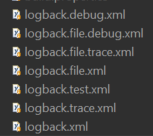
Default is logback.xml which will print only information, warnings and errors. A more detailed information can be get with using debug and even more with trace. The versions with .file. inside print the log output to a file that in configured here.
To change the default behaviour there are two ways:
- You can rename one of the files to logback.xml
- You can define the logback config in the product files.
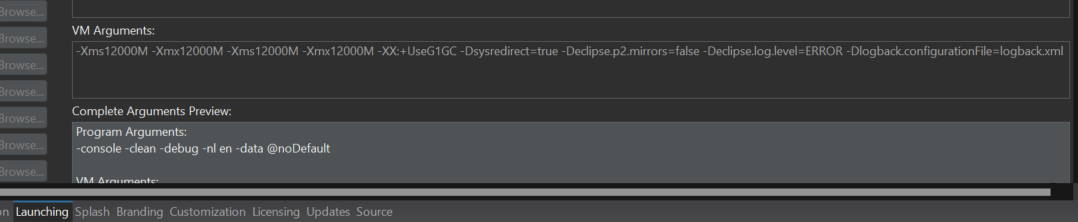
To enable other logging levels in docker
use JAVA_TOOL_OPTIONS in the enviroment part, e.g.:
| Code Block | ||
|---|---|---|
| ||
  standalone01:
    image: odysseusol/odysseus:dev-latest
    stdin_open: true
    restart: always
    ports:
|
If you are developing Odysseus or using the downloaded product, you can custumize the logging behavior. To enable extended logging in the downloaded product do the following:
- Go to main directory of the installed Odysseus. If you are developing in Odysseus with Eclipse, you can go to the
de.uniol.inf.is.odysseus.slf4jfeature and open thelog4j2.xmlfile and skip the next steps until step 5. - Go to: plugins
- Go to: de.uniol.inf.is.odysseus.slf4j_[some version number]
- Open File: log4j2.xml
- Find line:
| Code Block | ||
|---|---|---|
| ||
<Root level="warn"> |
- Change the line to:
| Code Block | ||
|---|---|---|
| ||
<Root level="debug"> |
Remark: See official Log4j2 documentation for further informtion.
There is also the log4j2.test.xml file where you can find examples to define the logger for each feature individually.
Example for an additional file appender
If you want to add an file appender next to the console appender, you need to add an appender and an an appender reference to the log4j2.xml file as follows:
| Code Block | ||
|---|---|---|
| ||
<?xml version="1.0" encoding="UTF-8"?> <Configuration status="WARN"> <Appenders> <Console name="Console" target="SYSTEM_OUT"> <PatternLayout pattern="%d{HH:mm:ss.SSS} [%t] %-5level %logger{36} - %msg%n"/>- 18888:8888 </Console>environment: <RollingFile name="RollingFile" fileName="logs/Odysseus.log" filePattern="logs/Odysseus-%d{MM-dd-yyyy}.log"- JAVA_TOOL_OPTIONS=-Dlogback.configurationFile=logback.debug.xml ignoreExceptions="false">volumes: <PatternLayout pattern="%d{HH:mm:ss.SSS} [%t] %-5level %logger{36} - %msg%n"/> <TimeBasedTriggeringPolicy /> </RollingFile> </Appenders> <Loggers> <Root level="info"> <AppenderRef ref="Console"/> <AppenderRef ref="RollingFile"/> </Root> <!-- <Logger name="de.uniol.inf.is.odysseus.core" level="debug" additivity="false"> <AppenderRef ref="Console"/> </Logger> --> </Loggers> </Configuration>- ./standalone01:/var/lib/odysseus |
Remark:
- The choices are the same as above.
- If you want to read the logs e.g. in WebStudio you will need to use the file based versions (e.g. logback.file.debug.xml)
Further Error Messages
Add the following file to you working directory of Odysseus to see further error messages. If you run inside eclipse, this file needs to be in the start folder of eclipse.