ATTENTION: There could be cases, where Odysseus starts with an error like "java.lang.IllegalArgumentException: no such operator: SHUFFLEFRAGMENT." (especially in the first starts) or "java.lang.ArrayIndexOutOfBoundsException: Index 104 out of bounds for length 104". We are working on this problem. Please try to restart!
This is a short tutorial that shows how to install Odysseus and how to setup the first time. This tutorial is for persons who just want to use Odysseus for data stream management. For those, who want to develop with Odysseus (e.g. create new operators or extend functionalities), may have a look at at Development with Odysseus, which introduces how to import Odysseus into Eclipse.
...
Remark: On MacOS you cannot start the Odysseus Studio.app. You will need to open the app (Show package content) and in the Contents section, move to folder MacOS and open studio. The app is not signed, so you need to relax your security configuration when downloading with Safari. When using Chrome for download, there seems to be no restriction.
If this does not work: You should go to the content folder via termial and change to folder MacOS. If studio has not execution rights you can use: chmod +x studio and run ./studio afterwards. Now Odysseus Studio should start.
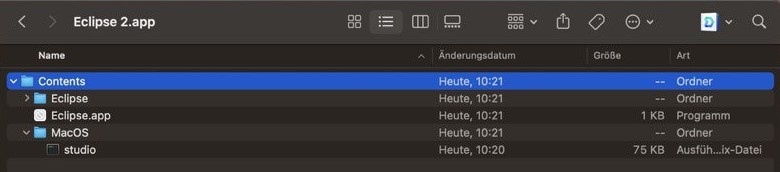
See further information on launching an unsigned app under MacOS 15.1 and beyond (https://www.heise.de/ratgeber/Unsignierte-Apps-auf-macOS-ab-15-1-starten-10218810.html, in german)
5. Choose Workspace
At the first start, you have to choose a workspace. This workspace is a directory where all Odysseus projects will be stored.You can also check the "Use this as the default.." option so that this dialog will not pop up at the next start of Odysseus.
...